
Address, custom domains, ports and voice chat
Open your server and click Network. The page shows how players reach the server.
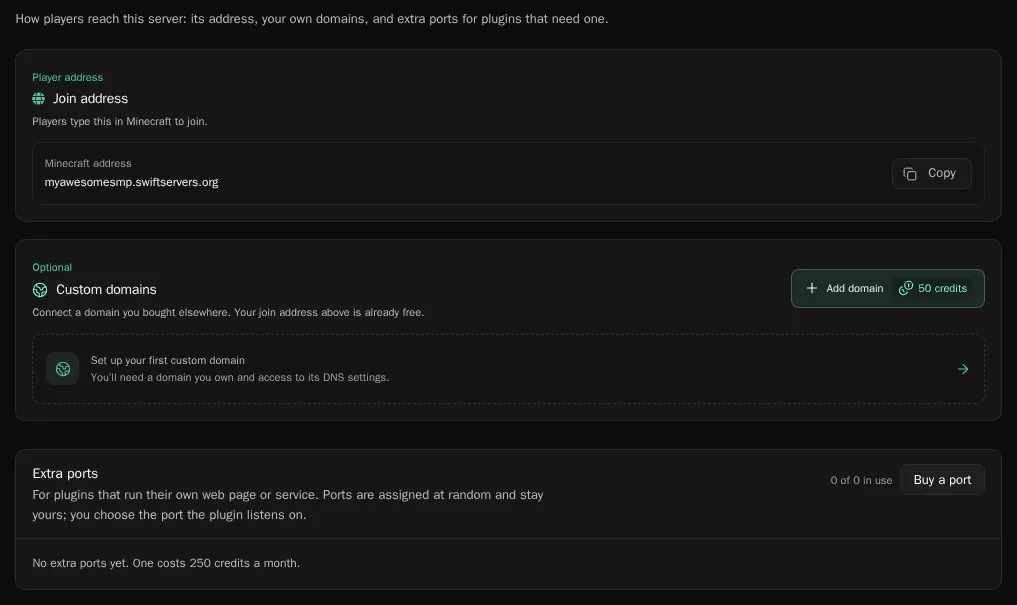
Your join address
Section titled “Your join address”Join address is the address players type in Minecraft, <name>.swiftservers.org. It’s free and always works. Click Copy to copy it. Bedrock players use the same address with port 19132.
Connect your own domain
Section titled “Connect your own domain”You can let players join with a domain you own, like play.example.com. You need a domain you bought somewhere else and access to its DNS settings. The panel doesn’t sell domains.
Each custom domain slot costs a one-time 50 credits. A server can have up to 10.
- Under Custom domains, click Add domain and buy a slot.
- Enter the address players should use, for example
play.example.com. - At your domain provider, add the DNS record the panel shows. It’s a
CNAMErecord from your address toplay.swiftservers.org. - If your domain uses Cloudflare, set the record to DNS only (grey cloud). Cloudflare’s proxy blocks Minecraft traffic.
- Wait on the page. It checks your DNS every few seconds and shows Your domain is ready when the record works.
No restart is needed. DNS changes can take a few minutes, sometimes longer, to reach everyone.
You can change the address later with Change address without buying another slot. If you change your mind before the setup finishes, Refund gives the 50 credits back. Only the server owner can add or change custom domains.
Add an extra port for a plugin
Section titled “Add an extra port for a plugin”Some plugins run their own web page or service on a separate port, such as a live map (BlueMap, Dynmap) or a web shop. They need an extra port.
- Under Extra ports, click Buy a port. A port costs 250 credits a month.
- Enter the Service port, the port the plugin listens on. Pick a number between 1024 and 65535, and set the same number in the plugin’s config.
- The panel assigns a public port at random. It stays yours.
Players reach the plugin at the node’s address and the public port, for example http://node1.swiftservers.org:<port>. The panel shows the link once the port is added. Click a port to open it in your browser.
You don’t need an extra port for the game itself or for voice chat.
Set up Simple Voice Chat
Section titled “Set up Simple Voice Chat”Every server has its own voice chat port. The panel writes the config for you.
- Install Simple Voice Chat from the Plugins or Mods page. On Paper it’s a plugin. On Fabric, Forge and NeoForge it’s a mod.
- On the Network page, find SimpleVoiceChat and click Apply config.
- Restart the server.
Players install the Simple Voice Chat mod in their own game to talk. It connects to the right port by itself.