
Plans and upgrades
Each server has its own plan. Every server starts on Free, and you can upgrade one server without changing the others.
Compare the plans
Section titled “Compare the plans”This table comes from the panel, so it’s always current.
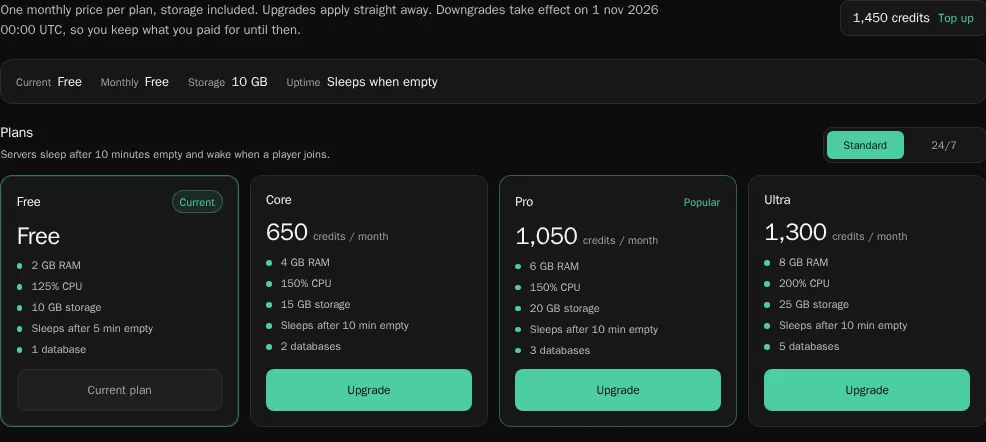
| Plan | Memory | CPU | Storage | Databases | Sleeps after | Per month | With 24/7 |
|---|---|---|---|---|---|---|---|
| Free | 2 GB | 1.25 cores | 10 GB | 1 | 5 min empty | Free | Not available |
| Core | 4 GB | 1.5 cores | 15 GB | 2 | 10 min empty | 650 credits | 1,050 credits |
| Pro | 6 GB | 1.5 cores | 20 GB | 3 | 10 min empty | 1,050 credits | 1,300 credits |
| Ultra | 8 GB | 2 cores | 25 GB | 5 | 10 min empty | 1,300 credits | 1,700 credits |
A server that “sleeps after 10 min empty” stops when nobody has been online for 10 minutes, and wakes when a player joins. 24/7 keeps it online all the time. See sleep, hibernation and deletion.
Paid plans also start before free servers when nodes are busy. See the startup queue.
How much memory do you need?
- Free (2 GB) is enough for a small group on Paper with a few plugins.
- Core (4 GB) suits a growing community or a light modded server.
- Pro (6 GB) and Ultra (8 GB) are for big servers and modpacks, which usually need 6 to 8 GB.
Upgrade a server
Section titled “Upgrade a server”- Open the server and click Upgrade in the sidebar.
- At the top of Plans, choose Standard, or 24/7 to keep the server online all the time.
- On the plan you want, choose how to pay:
- Subscribe pays every month with a card, PayPal or another method through Whop. It costs less than paying in credits.
- Pay … credits takes the first month from your credit balance now, then renews from your credits every month.
- Confirm. An upgrade applies straight away.
Only the server owner can change the plan.
Downgrade or cancel
Section titled “Downgrade or cancel”Pick a smaller plan, or Free, on the Upgrade page. A downgrade takes effect at the end of the period you paid for, so you keep what you paid for until then. To undo a scheduled change, select your current plan again.
To cancel a subscription, go to Billing in the dashboard sidebar and cancel it under Subscriptions. The plan stays until the end of the paid month.
When a payment fails
Section titled “When a payment fails”- Credits. If your balance can’t cover the monthly renewal, the server goes back to Free.
- Subscription. If a card payment fails, the subscription shows Past due. The server keeps running for 72 hours while Whop retries. After that it’s suspended until the payment goes through.
Delete a server with a paid plan
Section titled “Delete a server with a paid plan”Deleting a server never loses the plan. A subscription stays on your account and keeps renewing. To use it on another server, open that server’s Upgrade page and click Use it here. A credit plan gives the unused part of the month back as credits. See delete the server.